Yes. It needs at least two states in order to change states. Changing the state is what triggers it to do something. As I said, both states can be empty–or they can contain whatever–does not matter. With these interaction options, it will automatically change states until you tell it to stop:

If you want it to repeat every 15 s then change the “Repeat every 30000 ms” to 15000 ms. Likewise with timing when to show lightning and blink images. Just remember that it will fire each of the commands in this sequence as fast as the computer will execute them, it will not wait for animation durations. You need to add in the Wait commands and account for how long things should take. …Then you always have to tweak things by trial and error.
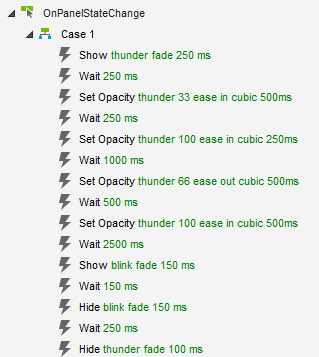
Here is the animation sequence for the Control Loop dynamic panel, set to take a total of about 5 s currently:
So,
The thunder image fades in for 250 ms (to 100% opacity)
We wait 250 ms for that to happen
It fades to 33% opacity over the next 500 ms
We wait 250 ms for that to happen–halfway
It goes all the way to 100% opacity over the next 250 ms
We wait 1000 ms (So, it should start to flash partway, then all the way, then stay steady for about 750 ms…)
Then it fades down to 66% opacity over the next 500 ms
… etc …
Hopefully, this gives you enough to adjust the timing to your needs.