I just misunderstood your intent–I thought if the field contained text and user clicked ‘x’ it would clear the text, otherwise if blank it would delete the row. Glad it works for you now though!
I wish there were an “All rows” option in the Delete Rows and Update Rows actions, but alas…
I agree that a condition builder dialog would make things easier. I haven’t looked at RP10 beta yet–maybe Axure has improved this?
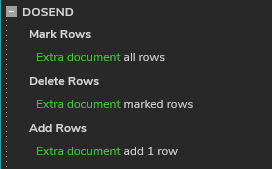
But in general, you’ve got two steps here: 1) Delete all the rows; 2) Add a new blank row.
Two approaches I know of for step 1:
- First, mark all rows, then choose the “Marked” radio button in Delete Rows action. I think this is the easiest.
- Or, in one Delete Rows action you can specify a rule that would apply to all rows, no matter what content is in the repeater dataset. Something like, [[TargetItem.index != -1]] (because it is impossible to have a negative index, this would logically refer to all rows.)
For step 2, just include an Add Rows action with a blank value for at least the first column (and you have only one column anyway.) Double-check that the resulting Interaction code reads “… add 1 row” and not “… add 0 rows” (because that is a possibility for some strange reason.) In the updated RP file below, this is what I added for the DOSEND event from your button master:
2021.02.19 Keeping input text when updating a repeater.rp (161.6 KB)
Honestly, I’ve found this forum to be the best source. First, try to search for what you need to see if it has been covered already (although the search function is not all that great…) One of the most knowledgeable users on this forum is josephxbrick and he created an article on Medium about Axure repeaters. See this thread: Source on How to Use Repeaters and Local Variables? - #3 by josephxbrick