Yes, this is really good info to know! Here is the reference documention for the built-in system variables and widget properties, as well as math, string, date, etc. functions.
RP 9:
RP 10:
Pay attention to the first section of that page that explains how to get to the list of all available system variables and functions. It is very useful for creating expressions because you can click any of them to insert it into your “Edit Value” dialog.
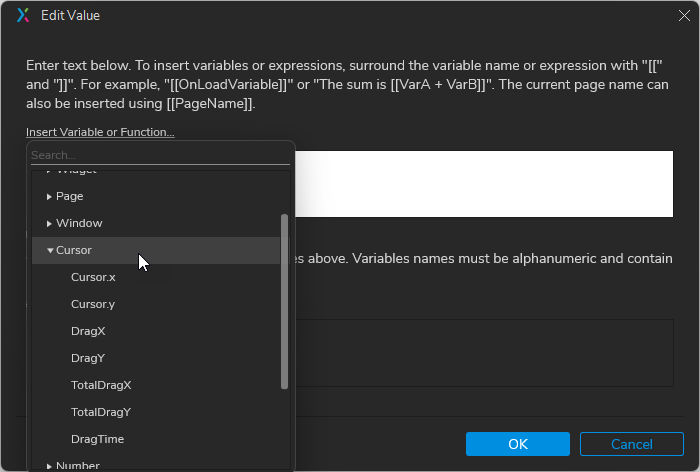
For example, if I wanted to get current information about the cursor position, I would click the little “fx” button to the right of a value field in an action, then click “Insert Variable or Function”, then spin open the “Cursor” category, then click on “Cursor.x” or “Cursor.y” …here’s a screenshot:
…and don’t sleep on the Search feature here. Instead of scrolling through the list, you can start typing something, like “cur” to find “Cursor”, or “item” to get to the list of repeater column names.
The “Insert Variable or Function” is especially helpful for repeaters, because when you target a repeater you can see all of its datasheet columns. So, if I wanted to get the first character of a node name in your tree repeater, I could look at the list of Repeater properties:
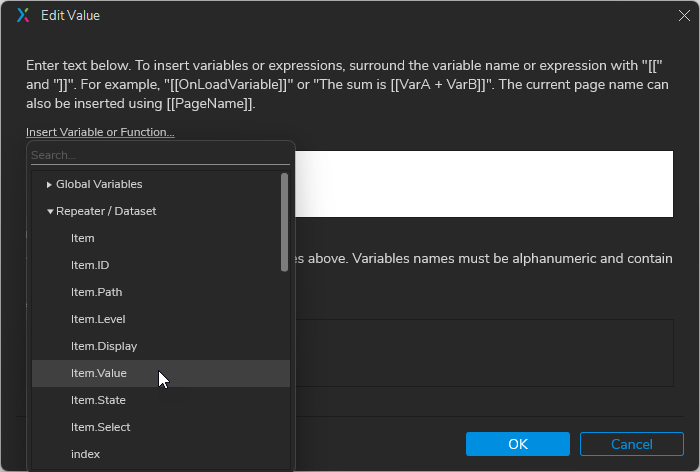
…then click on the “Item.Value” item to get that entered into my expression:

…then look through the String properties, choose “charAt(index)” and use “0” for the first char index:

So, you can see that in general, like in javascript, you can chain dot-properties and functions. …Usually. There are some exceptions, which are not really documented anywhere …except really in this forum. Some major examples are Axure’s lack of support for regular expressions (RegEx) and arrays. Searching the forum for a function name or whatever you want to do is a great first step though. Also, because the functions are based in javascript you can also search the web for things like, “javascript cursor” or “javascript get the first character of a string”. The Mozilla Dev site and StackOverflow results are usually the best hits.
Now, for your specific question about moving a menu widget/group/panel to the cursor location, here is an updated file with a demo on Page 3.
Tree node made by repeater.rp (190.3 KB)
- I created a dummy menu group of widgets named, MyMenu
- It hides itself automatically with a Loaded event.
(I could have just set it to hidden in the editor, but I find its harder to edit things, or even know/remember what is there if things are hidden by default.) - Clicking it hides itself (and deselects all selected rows in the repeater.)
- It hides itself automatically with a Loaded event.
- To the “Node” dynamic panel, I added actions to the Context Menu (Right Click) event:
- Moves MyMenu to ([[Cursor.x]], [[Cursor.y]])
- Shows MyMenu