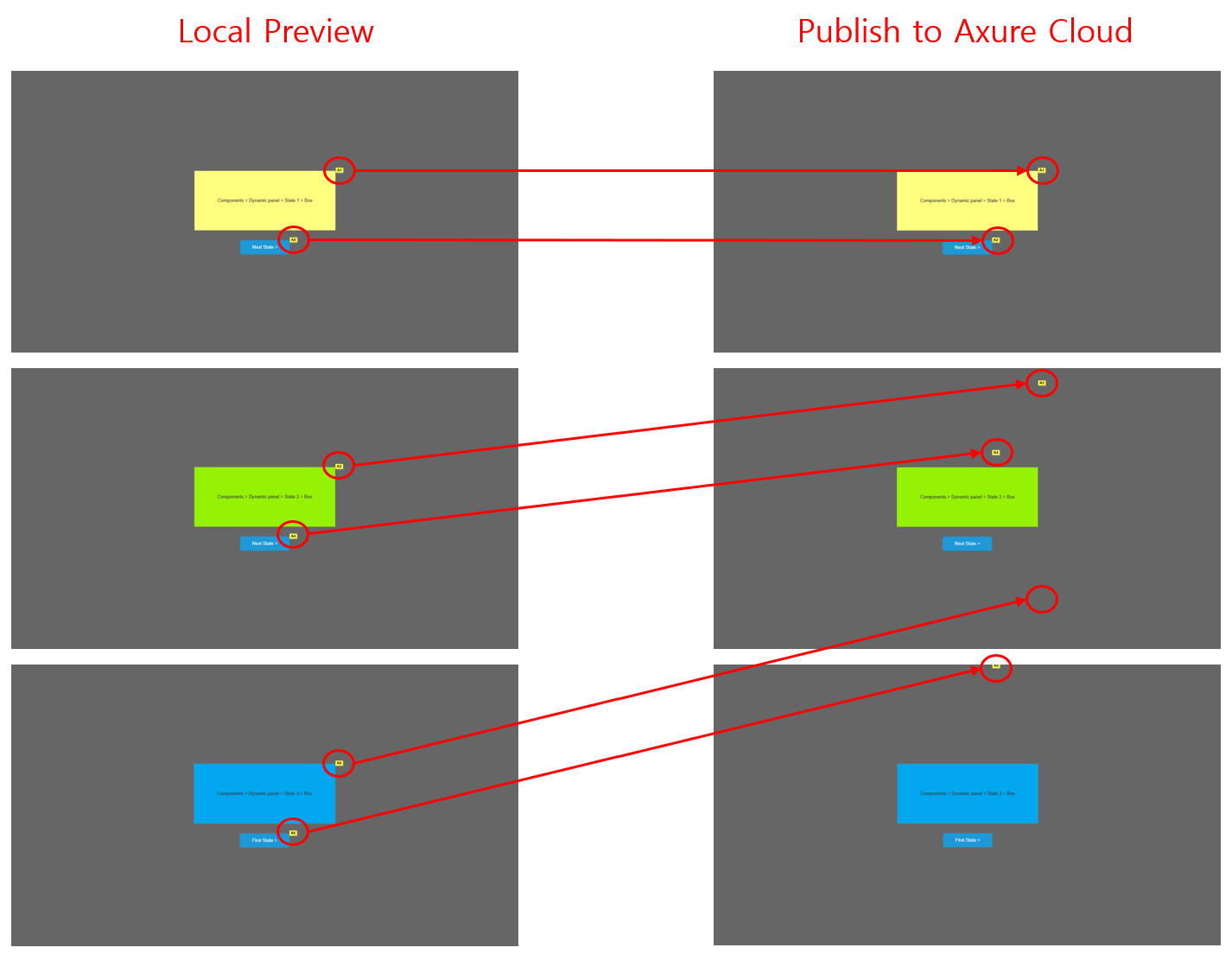
I am currently experiencing a bug where notes are displayed in the wrong positions. This issue is causing delays in our team project and leading to unnecessary communication overhead.
While the feature works correctly in the local environment, the issue consistently occurs after uploading to the Cloud.
Bug Conditions & Steps to Reproduce:
Page Setup: Specific width and height are set for the page.
Trigger: 1. Display a component on the page.
2. Change a panel within a Dynamic Panel inside that component.
3. The notes for objects within the updated panel appear in incorrect positions.
Nezmi wrote in to support about this, and this is caused by a discrepancy between Axure RP and its cloud generators. Although the latest builds of RP 11 (4135+) contains the fix with the errant note positioning after a panel state change, the generators haven’t been updated yet to reflect these changes. This will cause the local preview of the project to work correctly, but not the published version.
Our development teams are currently working to get those generators updated, and I’ll be sure to update this thread once that’s done.
Our development team has updated the generators for the latest build of RP 11 (4137), so the dynamic panel notes issue should now be fixed. If anyone was running into a similar issue, please re-publish your project to Axure Cloud to see the changes in the published version. Thanks!