We shared a site and now want to prevent/remove that share from others seeing it. I am not able to find this in my app.axure site. I also don’t see how I can add a password to a previously shared site from RP9 application.
Axure RP doesn’t provide a full server/directory interface, so you’ll need to do this separately. I think the most you could do from Axure RP would be to replace a prototype published to Axure Cloud with a blank prototype.
If you published a prototype to Axure Cloud, you can delete, move, add/remove a password for a prototype via the web app interface (e.g., opening app.axure.cloud in a web browser.)
You can prevent it from sharing a published site in 2 ways, both done through their Axure Cloud web interface:
- Add a password
- Make it private
Hello, jebwhs87
Steps to make the project private / add a password:
- Login to https://app.axure.cloud/
- Go to your workspace and click on the project name
- You will land on the ‘OVERVIEW’ tab. Here on the right hand side you should see the project details along with publish information and an ‘Edit’ button.
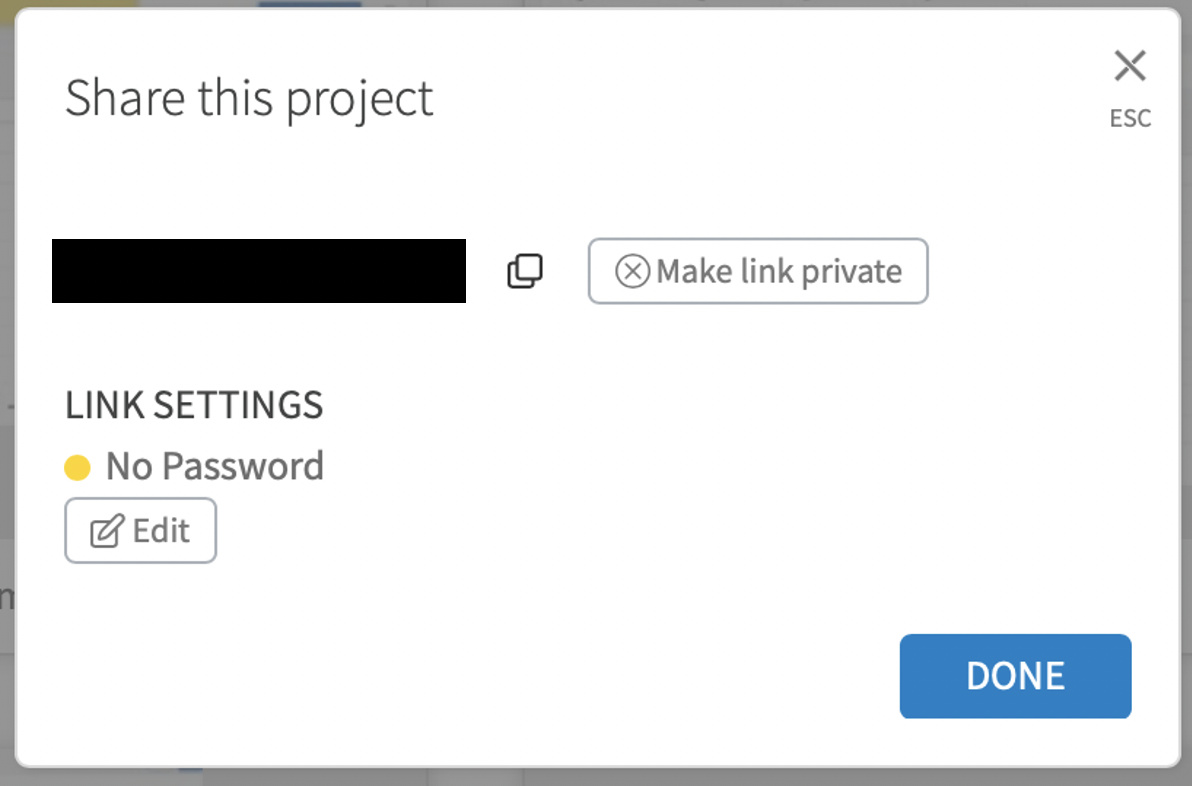
- Click the Edit button, and you will get a popup to share the project
- On this popup you have both the options:
- Make your project link private: Toggle the button to ‘Make link private’ or ‘Make link public’
- Add a password: Under the Link settings click the edit button to add/edit a password
Hope this helps!