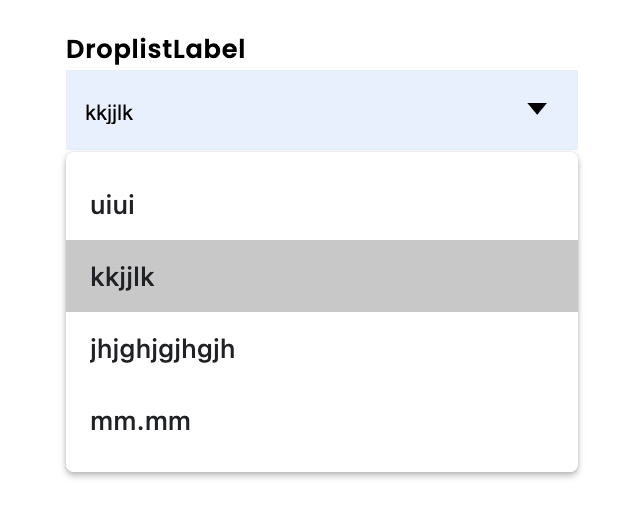
As I am trying to design my own dropdown list with a repeater based option list - which works fine in it’s basic form, I now want to built in an autosuggest function.
I don’t know yet how far I will succeed getting this fully functional, but as soon as I started, I found an unexpected issue when I let the user type in the input field:
In my Mac/Chrome browser, when I start clicking in the input field, the system offers me a list of options that I filled in earlier, and which completely covers the underlaying option field.
It looks like something the browser adds (as the styling does not reflect my styling), and I am very curious to find a way to get rid of this.
Ideas anybody?
Hereunder you find som screen capture that illustrate the issue:
Image above: Start typing to start the autosuggest function, adds a layer with earlier strings I typed in the field as suggestion - I don’t know what the name this function is - ‘historical suggest’ maybe? This layer completely covers the underlaying option list.
Thank you MBC,
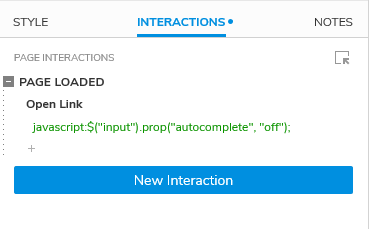
Unfortunately, I see the Google documentation which is referred to not matching with my Chrome browser so I do not succeed in switching it off.
And second, if this would be controllable with HTML or a script, it would have been very helpful if Axure could handle this by adding a checkbox. controlling this as a property for the text field object.
Regards,
Igor
PS @mbc66,
In meanwhile I found your an answer of yours in another thread: How to filter a Repeater-Field that contains specific String?. This can be part of the solution, but what astonished me, is that there is a text field used as well, but it does not show the disturbed behaviour as in my dropdown list. (Downloaded the Live dynamic filter file and tested it in Chrome).