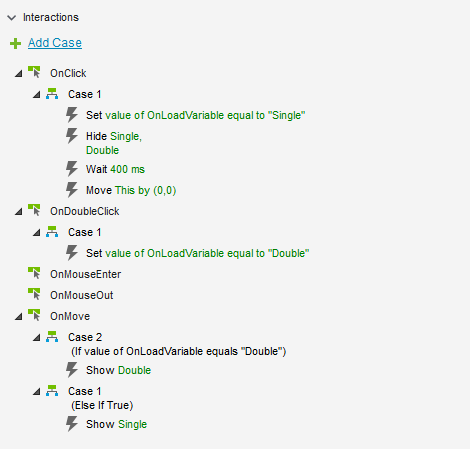
You’ll want to put a wait in to see if the double click is fired and then perform your action. I can give a more specific example if you can share your RP file, but without seeing it, take a look at this example.
The example uses a global variable (You can also set text on a hidden widget if you prefer)… on click sets the variable to single, on double click updates to double. Wait 400 ms (give axure a chance to determine if there was a double click) and then move itself by 0,0. I put the logic on the move to perform an action if the variable is “single” and a different action if it’s “double”:
Take a look and let me know if you have any questions.
Thank you for your reply. I would assume that the backend Axure program would inheritly distinguish the difference between a single and double click. That not being the case, I followed your tip.
With that said, this solution worked!
I followed the example exactly (except I didn’t need to use a hide command). For the “Show” commands I just cut and pasted my commands (that I previously created under “OnClick” and “OnDoubleClick”