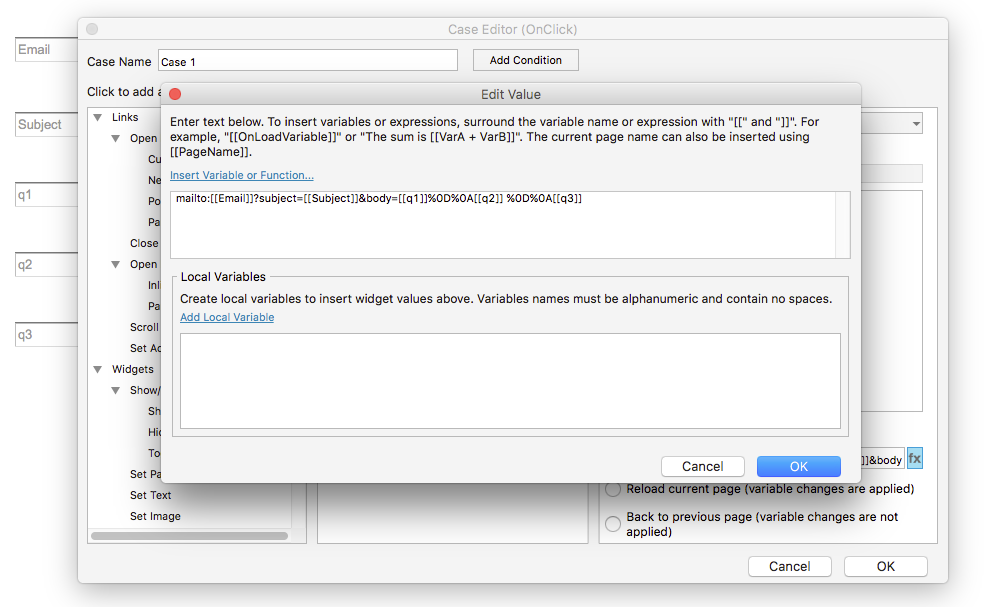
Hello! If you’re using the mailto: command in an Open Link action, then you may be able to set the body of the email to display the values of your variables using the following format pulled from the post below:
The above, for example, would take two values stored in two body variables and insert a carriage return in between. Your file sounds like it contains many more variables than the sample, but hopefully this helps!
I’ve reopened the topic to help address your latest question:
I’m using the line of code you’ve suggested, the only thing I’m not quite getting is how do I load the variables into that line of code? (my variables are called q1, q2, q3 etc) (i.e. do I replace the %0D and %0A with my variable, and if so, how? I’ve tried %q1 but no luck)
To insert your variables into the suggested code, you would want to replace the body variables ([[body]] and [[body2]]) with your q variables. The “%0D%0A” portion can stay in between each variable if you want the variables separated by a newline. For example, if you wanted q1, q2, and q3 to display in the email on their own lines, then the code would look like: