Hi Sarah,
For this, I would suggest using a widget group. What you’ll want to do is group the three images so they can be treated as a single widget. Then, under the OnWindowResize event, set the group’s width to [[Window.width]]. The group will stretch out to fill the width of the browser window, and the contained images will be resized automatically.
It’s worth noting, though, that this alone will not maintain the group’s starting aspect ratio. To do that, you’ll need to set the group’s height to [[Window.width*(StartingHeight/StartingWidth)]].
Putting these together, this is what the “Set Size” action for the images in your file would look like:
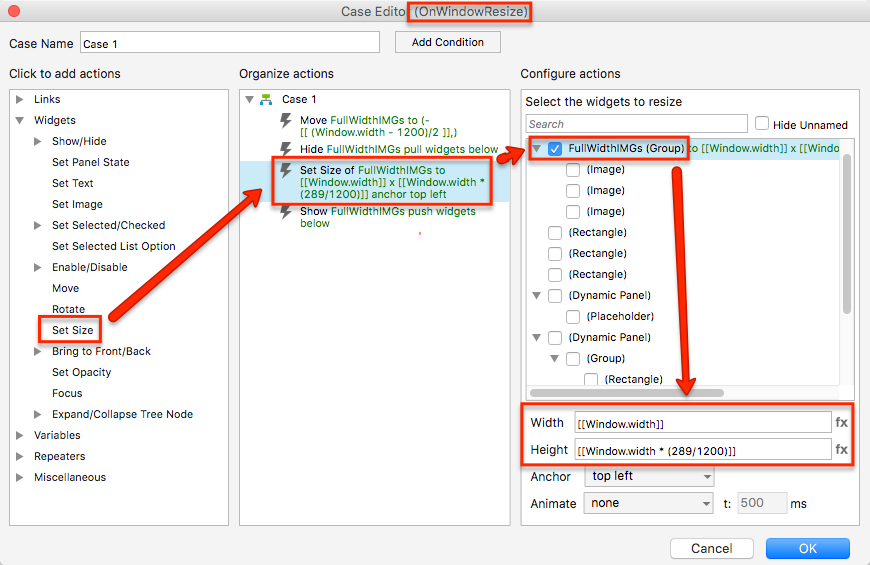
Notice that I’ve also set up a few other actions in this case.
The “Hide” and “Show” actions sandwiching the “Set Size” action are there to ensure that the content below the images moves up and down on the page as the image group is resized, thus maintaining a set distance between the images and the content below them. This “push/pull sandwich” takes advantage of the “push” and “pull” options available in “Show” and “Hide” actions, which you can read about here: Push/Pull and Groups
The “Move” action accounts for the fact that your page content is center-aligned. On a left-aligned page, the X coordinate is equal to 0 at the left edge of the browser window, so any widgets at X=0 on the RP canvas will hug the left edge of the browser window. On a center-aligned page, however, the X coordinate is equal to 0 somewhere in the middle of the browser window, depending on how wide your page content is on the RP canvas. As such, if you want a widget to hug the left edge of the browser window, you need to move it to an appropriate negative X value with the expression -[[(Window.width-ContentWidth)/2]]. In your file, it looks like this:

(Note: Once you’re more comfortable with Axure RP expressions, I would suggest using variables in place of the hard-coded numerical values I’ve used in these examples.)
I’ve attached an edited version of your RP file demonstrating this setup. Take a look, and let me know if you have any questions.
Also, just as a reminder: The Axure RP forum is primarily community-driven. Though we at Axure will occasionally step in to help out, the vast majority of queries will be handled by our knowledgeable and experienced user community. As such, if you need a direct response from an Axure teammate, try emailing us at support@axure.com instead of posting on the forum. We answer most emails same-day, often within a few hours of receiving them!
100% width images_EDIT.rp (76.1 KB)

