yaba
March 10, 2026, 4:24pm
1
Many SVG icons that we use, when added to an Axure project, are invisible in the editor, but visible when running the mock.
Example SVG:
<svg width="16" height="16" viewBox="0 0 16 16" fill="none" xmlns="http://www.w3.org/2000/svg">
<path fill-rule="evenodd" clip-rule="evenodd" d="M0 3C0 1.89543 0.895431 1 2 1H14C15.1046 1 16 1.89543 16 3V13C16 14.1046 15.1046 15 14 15H1.5C0.671573 15 0 14.3284 0 13.5V3ZM2 2C1.44772 2 1 2.44772 1 3V13.5C1 13.7761 1.22386 14 1.5 14H14C14.5523 14 15 13.5523 15 13V3C15 2.44772 14.5523 2 14 2H2Z" fill="#313233" style="fill:#313233;fill:color(display-p3 0.1922 0.1961 0.2000);fill-opacity:1;"/>
</svg>
victor
March 10, 2026, 6:30pm
2
It looks like RP doesn’t like this style property. If you remove it, it seems to render. We’ll look into it.
Can you tell me where the SVG is from?
1 Like
yaba
March 11, 2026, 7:53am
3
Thank you. It was exported from Figma like all of our icons.
yaba
March 11, 2026, 7:58am
4
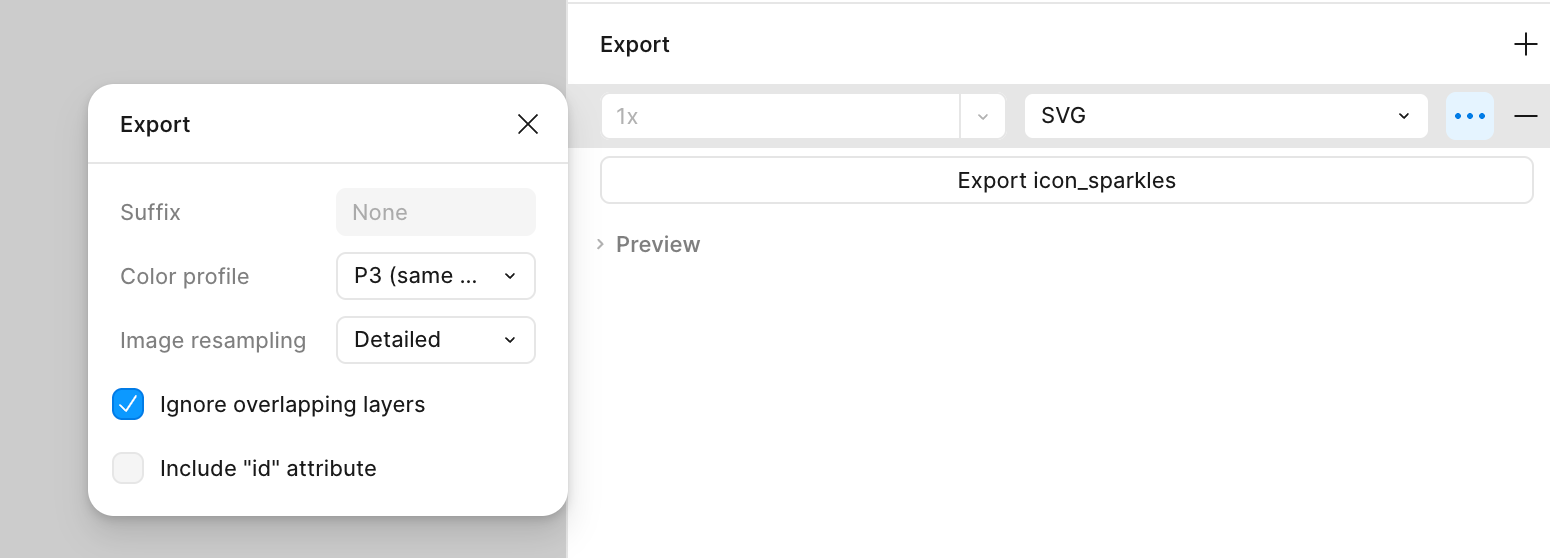
Looks like this is how they got exported from Figma:
Note the color profile setting, which was set to ‘P3’.
I can confirm that when switching the Color profile to sRGB, then this issue does no longer occur. Thank you very much for the quick help. A fix for this issue would be great nevertheless.
victor
March 11, 2026, 5:34pm
5
Thanks for figuring out where it was coming from. We will look for a fix.
system
March 25, 2026, 5:34pm
6
This topic was automatically closed 14 days after the last reply. New replies are no longer allowed.