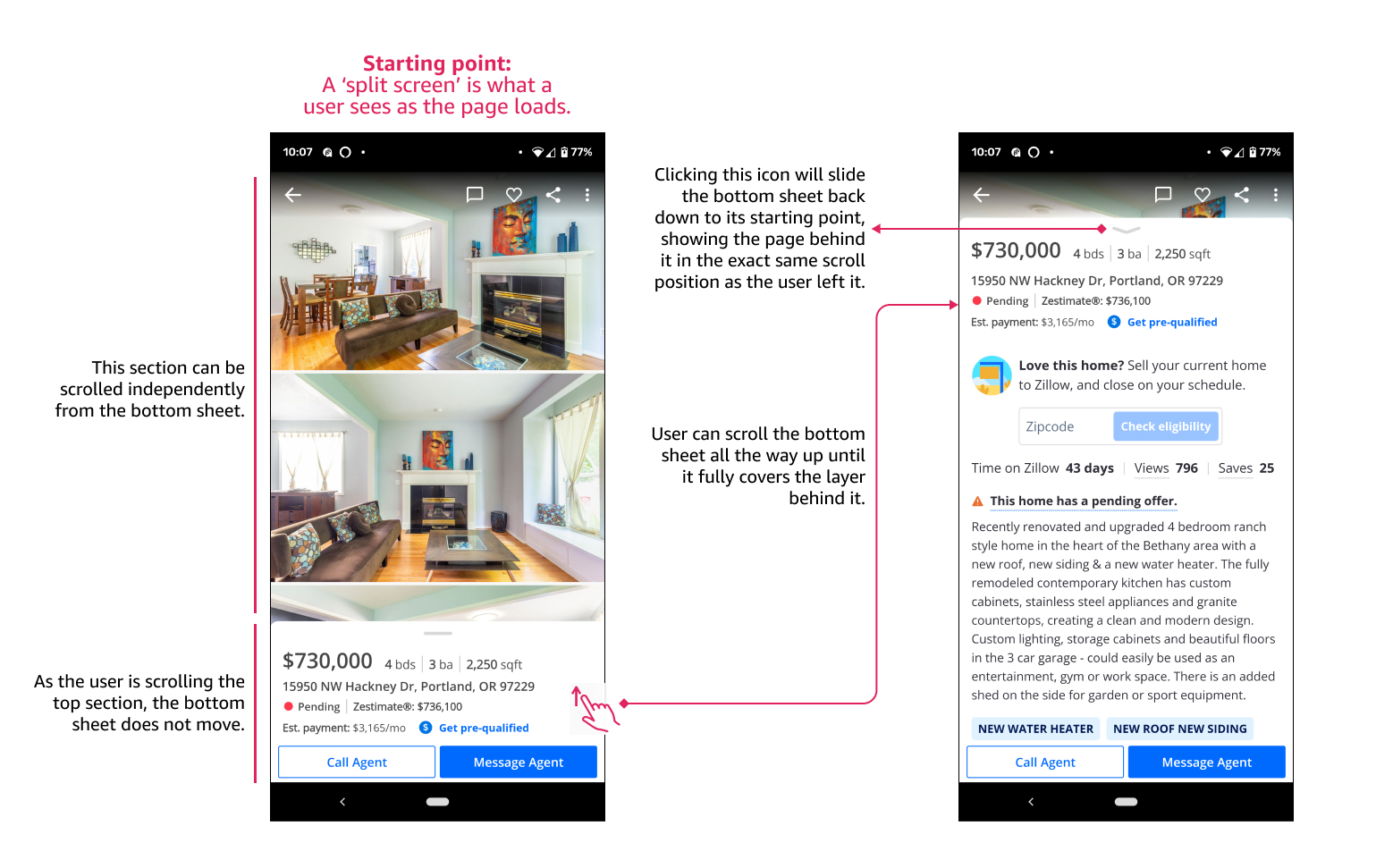
I want to have the bottom sheet peak out on the bottom of the screen as the user enters the page. The user can interact with anything on the page as usual, and if they want to see the mobile bottom sheet content, they swipe it up from the bottom to bring it into view. If they swipe it up all the way to the top, they should see an “X” button to get it back down, or they can scroll all the way down to see the ‘starting point’ page again.
Axure RP can detect the gesture ‘Swipe’ in all four directions (left, right, up and down) - why don’t you just use those? When you detect that gesture you can ‘Move’ your group or dynamic panel (this could be your ‘sheet’) into a new position (from bottom part of the screen, midway or all the way to the top). Then when the group or dynamic panel is in a certain position on the screen, that you define, you can choose to hide or show content like the “X”-button.
Hi @Bahcos, thank you for your reply! I wasn’t able to get this to work, maybe because of the 2 layers of scrolling I am trying to achieve. Appreciate any guidance! Zillow has an example the interaction I am trying to get. I am attaching some screenshots.
Certainly! I’m attaching a simplified version of the prototype.
Things to note -
The ‘swipe up’ action for the bottom sheet does not work unless the page ‘behind’ the bottom sheet is fully scrolled all the way. The same thing happens when trying to swipe the bottom sheet back down. I’d like users to be able to swipe it up or down whenever they want.
When the bottom sheet is up, the page behind it can still scroll, depending on where the user’s mouse is. Is it possible to force it not to scroll?
I have just created this project (It’s Axure RP 10, sorry!).
Note: there is a huge difference when trying/testing the prototype on the computer’s browser and the mobile’s browser. When I try this project in the computer’s browser, I get the same behavior as you described in 1 and 2. When I try it on my mobile, it works as expected; the background behind does not scroll, and the swipe works as expected. I assume it’s because a ‘Swipe’ in desktop and mobile is not the same.