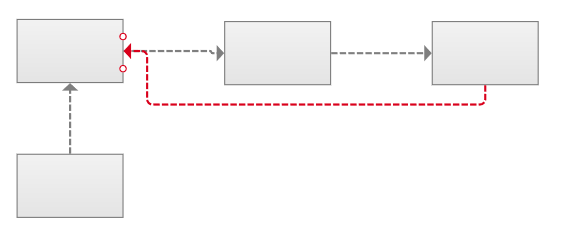
I would be a good feature for there to be more anchor points on the flow tools than just the middle point on each side of a shape (at least for the rectangular shapes). Often times there are “loopbacks” which causes overlaps with existing connections. See red dots in the screencap below.
Additional connector points can be added using the Connector Point tool, which you can access from the “More” dropdown of the main toolbar, or by using the shortcut [CTRL] / [CMD] + 8.
When this tool is in use, you can click on a widget to add more connector points, as described in our Connectors article here.
I can get this to work in Ax8 but I can’t figure it out in Ax9. Has this been implemented yet? In Ax9 it seems that it only wants to add a point to the shape, not a place to connect arrows.
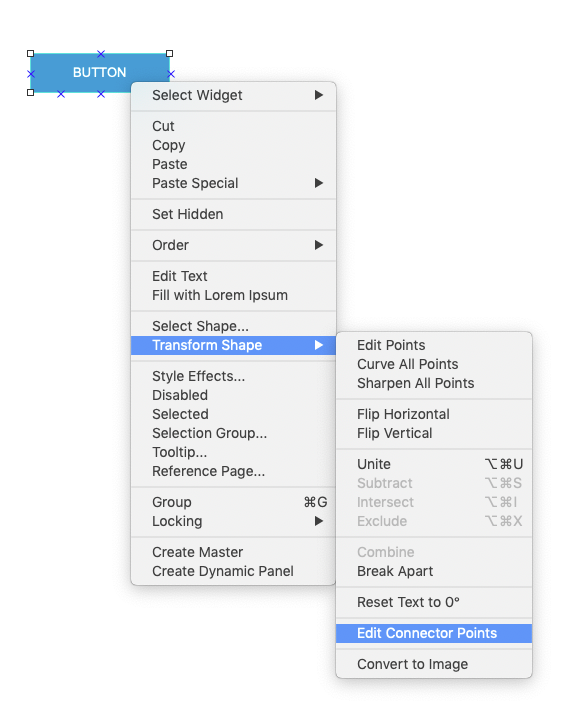
Ah, thanks for clarifying! For Axure RP 9, connector points can be edited in this way by right-clicking on the widget, then navigating to Transform Shape > Edit Connector Points.