Hope I am missing something simple, new to Axure so definitely could be a newbie thing (I did scan the forum first, couldn’t find anything that fit my request).
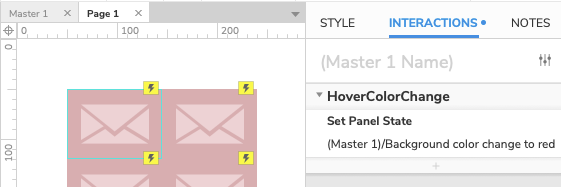
I have some metro tile-esque icons I have created and exported as .png files with the background set to transparent (see below for example). I want to build a master with a grid of 9 of these icons such that I could easily change the background fill color on them ‘within Axure’ on the style tab. The icons are definitely being imported with transparent backgrounds but the Fill option on the style property is grayed out (at a guess Axure is telling me there is no background to provide fill for, maybe I’m expecting too much here). Any help, greatly appreciated.
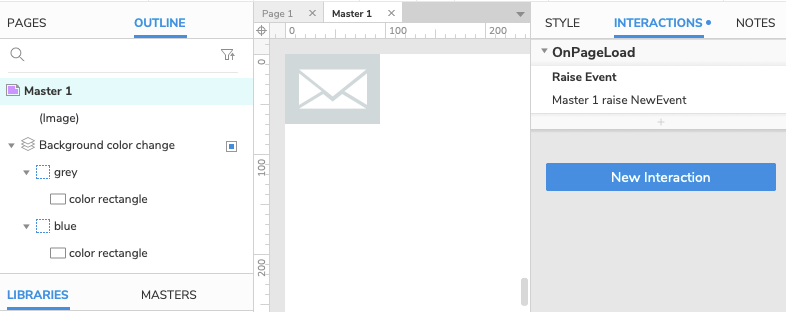
While background colors cannot be directly applied to transparent image files, you could create a master and place a dynamic panel or a simple rectangle widget behind your images. In this way, you could either directly modify the color of the rectangle in your master, or you could create dynamic panel states with rectangles that can display different chosen colors. While these dynamic panel state colors would have to be created through the master, you could pick which color to display on a page using a raised event. You could create a raised event for the master as the master loads on the page, and have this event set the dynamic panel to a particular state on the page. Please see in the sample file below where the raised event is used to make the masters placed on the page alternate between the states “grey” and “blue”.
Chelsea, thanks so much for taking the time to answer and provide the example. Masters and specifically ‘raised events’ are something I’m trying to get my head around, but definitely that would be the most sensible way to go.
I’ve gone through the file you sent looking at the iterations of the dynamic panel and I’m about 80% there but something isn’t clicking. I tried to add a third state with a different color and hitting a wall. Not sure if it’s at all possible but is there any support resource you think I could get online with over the phone or a web session just to quickly go through the logic (instead of me filling this forum post in an asynchronous manner). I feel if I can get my head around this part of Axure it will be incredibly useful.
OK, before I get banned from the Forum for overposting I had a little more time to dive into the attached example above and I think I may be getting it. Create a Master, Dynamic element in that master that can have multiple states, then use raised events on the page to target different iterations of the master by virtue of calling one of the available states. Modular and logical thinking and approach. If I can just get one more piece of related functionality to work I’m off to a great start in solving a specific problem here…so really appreciate some jedi weighing in.
In the above example Chelsea created, she has two states in a dynamic panel. Grey and Blue, and each one changes the background fill and therefore the background of a transparent tile. I can see that I can duplicate one of those states, change it to red, then have three possibilities for tile color etc. All great. What I really want to be able to do is have an ‘OnMouseHover’ interaction that somehow calls a different state within the dynamic hierarchy. So default gray, when hovered over it switches to the blue state and so the icon changes fill. Does any Axure master out there know if that’s possible and roughly how to do it?
Thanks loads in advance, I promise to pay it forward when I get a bit more useful at this tool.
You’re really close! One thing is that raised events are actions that are added to the master, rather than to the page. If you click on an empty place on the master’s canvas, you’ll see that there’s an OnPageLoad event that raises an event.
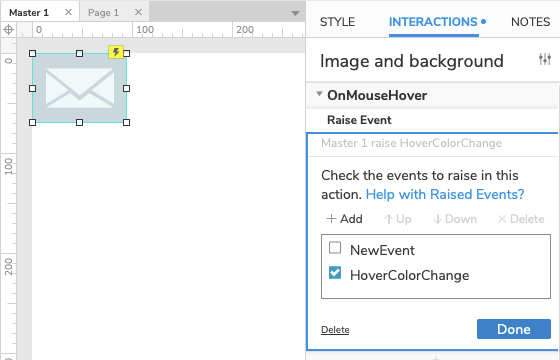
Because masters are not pages themselves, their events, such as OnPageLoad events, will only fire when the master has been added to a page. If you wanted to make a raised event fire when the mouse hovers over the master, you could create an OnMouseHover event for the image widget (or a dynamic panel or group containing the image and background), and have that OnMouseHover fire the Raise Event action.
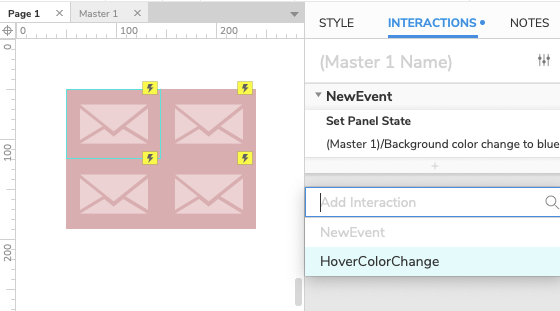
The actions that occur because of this raised event are determined by selecting a master that has been placed on a page. When a master has been placed on a page, you can select the master on the page click “Add Interaction” and the named raised event will display as an option.
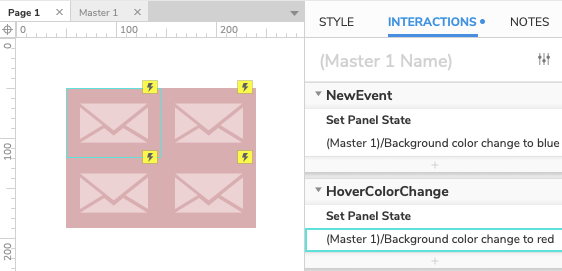
You can then select the raised event, and then choose which actions you would like to occur when this event’s conditions are met. If you wanted to have the dynamic panel change states from “grey” to “red”, you can set the raised event, which fires when the master’s OnMouseHover occurs, to set the dynamic panel state to “red”.
From the master, the event would look like this:
From the page, the event would look like this:
I’ve also attached a new sample file where OnMouseHover is used to raise an event, and then the raised event fires a dynamic panel state change on the page.


 I had a little more time to dive into the attached example above and I think I may be getting it. Create a Master, Dynamic element in that master that can have multiple states, then use raised events on the page to target different iterations of the master by virtue of calling one of the available states. Modular and logical thinking and approach. If I can just get one more piece of related functionality to work I’m off to a great start in solving a specific problem here…so really appreciate some jedi weighing in.